Small Business Marketing Videos: Your 2026 Strategy Guide
You've probably felt this already. You open Instagram or YouTube, see another local practice posting polished clips, patient education videos, or quick attorney explainers, and think, “We should be doing that.” Then the next thought lands right behind it. “With what time, what gear, and who's going to be on camera?” That hesitation is normal. […]
LElemurJune 16, 202618 min read
In this piece
You've probably felt this already. You open Instagram or YouTube, see another local practice posting polished clips, patient education videos, or quick attorney explainers, and think, “We should be doing that.” Then the next thought lands right behind it. “With what time, what gear, and who's going to be on camera?”
That hesitation is normal. Most owners don't need another lecture about how important video is. They need a practical way to make it fit real business life, with limited time, a small team, and a calendar that's already packed.
The good news is that video is no longer a mystery project reserved for big brands. It's a standard marketing channel. Wyzowl reports that 91% of businesses use video as a marketing tool in 2026. That doesn't mean you need a studio. It means your audience is already comfortable learning, comparing, and building trust through video.
For local businesses, that's an advantage. You already have what many larger brands struggle to create: a real face behind the service, real expertise, and real questions people ask every day. Small business marketing videos work when they make those strengths easier to see.
Small business marketing videos don't need to impress other marketers. They need to help a real person take the next step with your business. That might mean booking a consultation, feeling less nervous before a visit, understanding a treatment, or deciding you're the firm they want to call.
That's why local video works so well when it's grounded in service. A dentist can reduce anxiety by showing what a first visit feels like. A medspa can explain a treatment in plain language. A law firm can remove uncertainty by walking people through what happens after they make contact. None of that requires cinematic production. It requires clarity.
There's also a practical reason to take video seriously now. Audiences expect communication to be visual, concise, and mobile-friendly, not buried in long blocks of text. That shift creates pressure if you're behind, but it also creates opportunity for businesses willing to be useful and consistent.
Small business marketing videos work best when they answer the question a customer is already asking.
The strongest video programs are usually simple. They use short educational clips, straightforward service explanations, and trust-building content that helps buyers feel informed instead of sold to.
If you approach video that way, the whole project becomes more manageable. You're not trying to become a creator. You're building a library of answers, proof, and next steps.
Start with Strategy Not Your Smartphone
A common local-business pattern looks like this. The owner films a quick video between appointments, posts it, gets a few likes, and goes back to work. A week later, nothing changed. No better leads, no clearer questions from prospects, no measurable lift in calls or bookings.
That usually traces back to planning, not production.
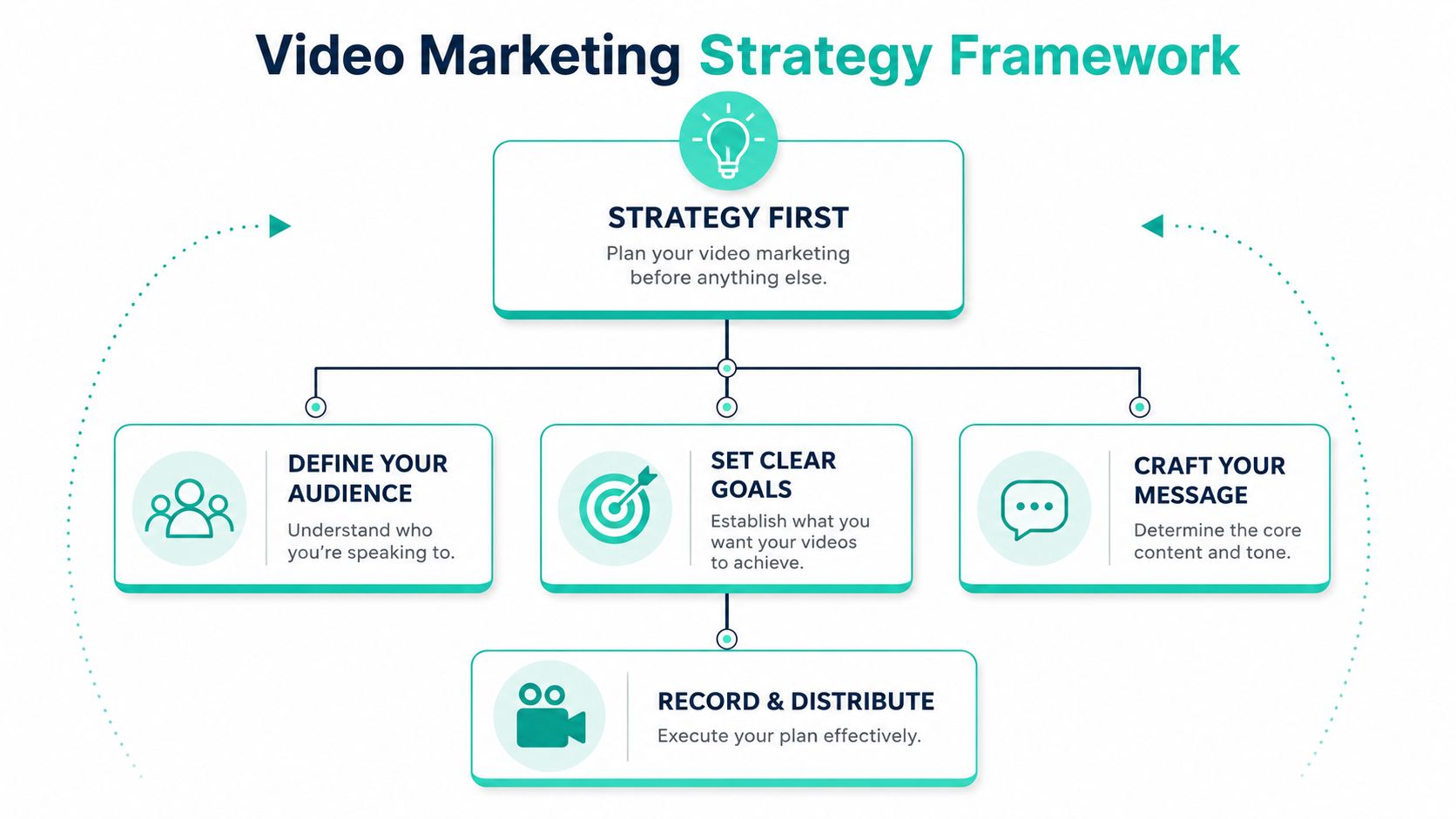
A useful video strategy fits on one page. For a small business, it starts with three decisions: goal, audience, and message. Get those right first, and your phone is more than enough.
To make that easier to visualize, use this framework as your starting point.
Goal comes first
Start with the business action you want after the view. Views alone do not tell you much if the right people never click, call, or ask a better question.
For a local practice, that action might be:
Book a consultation after watching a service overview
Call the office after seeing an FAQ clip
Visit a service page from a social post
Feel ready to inquire after hearing how the process works
Set up a simple way to track that action. Use UTM-tagged links where they make sense. Match each video to one clear CTA. Check whether the video drove qualified traffic, stronger watch time, form fills, or calls. That discipline keeps you from producing content that feels active but does not help the business.
The trade-off is straightforward. Broad goals create broad videos. A video meant to “educate people about Invisalign” often turns into a vague overview. A video built to get consultation requests from adults comparing cosmetic options gives you a sharper script, stronger thumbnail, and a more relevant landing page.
Know exactly who the video is for
Local businesses rarely serve one type of buyer. A dental office may need different videos for anxious new patients, parents booking for children, and adults comparing cosmetic work. A medspa may need one set of videos for first-time visitors and another for clients considering a higher-ticket treatment plan. A law firm often speaks to people under pressure, while also building trust with referral sources.
One video for all of them usually lands flat.
Before filming, answer three questions:
Audience question
Better planning question
Who is this for?
What specific kind of person is this for right now?
What do they know?
What are they confused or nervous about?
What do they need next?
What action should feel easy after they watch?
This matters even more if you or your team do not want to be on camera. Faceless video still needs a clear audience. A dentist can film a first-visit walkthrough with captions and no talking head. A medspa can show treatment prep, aftercare steps, or product selection with voiceover. A law firm can use text-led clips that explain what happens after a consultation request comes in. Those formats work because they answer a specific concern for a specific person.
Keep one message per video
A short video can do a lot. It cannot do everything at once.
Owners often try to fit services, credentials, office culture, testimonials, pricing, and a call to action into a single clip. The result feels crowded. Viewers remember very little, and the CTA loses force.
Pick one message the viewer should retain:
Dentist: “A dental implant process is more predictable than many patients expect.”
Medspa: “Microneedling works best as a treatment plan, not a one-time fix.”
Law firm: “Your first consultation is focused on clarity, not pressure.”
Practical rule: If you cannot summarize the video in one clean sentence, the viewer probably cannot either.
This is the part that saves time in production. A clear goal tells you what CTA to use. A clear audience tells you what examples to include. A clear message tells you what to leave out. That last part matters more than many business owners expect. Good strategy is often subtraction.
Video Ideas That Work for Local Professionals
Generic advice usually sounds like this: post behind-the-scenes clips, answer FAQs, share testimonials. That's not wrong. It's just too broad to be useful when you're staring at a blank content calendar.
Specific storylines work better. They give your team something concrete to film, script, and publish.
For dentists
Dental video performs best when it reduces fear, explains options clearly, and makes the office feel familiar before a patient ever walks in.
A few storylines worth using:
A day in the life of a dental implant Walk through the timeline from consult to placement to follow-up. Keep it simple. Show the room, tools, digital scan, and recovery guidance. This works well because patients often fear the unknown more than the procedure itself.
What happens at your first visit Film the path from front desk to exam room. Add short captions about paperwork, x-rays, exam steps, and time expectations. This is especially helpful for anxious new patients and parents choosing a family office.
Should you fix this now or monitor it Use a common dental concern and explain when treatment makes sense versus when observation is reasonable. This positions the practice as thoughtful and trustworthy, not pushy.
For medspas
Medspa buyers often need education before they need promotion. They want to understand what a treatment does, what it feels like, who it's for, and what realistic expectations look like.
Try concepts like these:
The science behind microneedling Explain the treatment in plain language. Show the tool, the prep, the treatment setting, and aftercare instructions. Add text overlays that answer the questions people usually ask in direct messages.
What this treatment is for and what it is not for This format works for injectables, laser services, body treatments, and skin rejuvenation. It protects your brand from overpromising and helps qualify better leads.
Before you book, know this Create a short pre-appointment education series. Cover sun exposure, medications, timing before events, and recovery expectations. The tone should be calm and informative.
For law firms
Legal video should lower uncertainty and establish credibility. It shouldn't feel theatrical. It should feel steady, clear, and direct.
Useful concepts include:
What to expect in your first consultation Explain how the conversation starts, what documents help, and what clients can ask. This removes a major emotional barrier for prospects who delay contact because they don't know what happens next.
Three mistakes people make before calling a lawyer Keep this educational, not fear-based. Explain common missteps in a measured tone and give a clear next action.
How a case usually moves from intake to resolution Use a whiteboard, text animation, or narrated slide deck. This format works especially well because legal processes are easier to trust when they're broken into stages.
The best local service videos don't try to go viral. They make a worried buyer feel informed enough to reach out.
Faceless video ideas that still build trust
A lot of owners avoid video because they don't want to perform on camera. That's fine. Video still works without a face in frame.
Screen-recorded explainers Great for law firms walking through documents, intake forms, or process timelines.
Text-overlay education videos Use treatment room footage, office clips, or stock b-roll from your own business while captions carry the message.
Graphic-based myth-versus-fact clips Excellent for medspas and dental offices that need to correct misconceptions quickly.
Narrated slideshows Useful when the information matters more than the personality on screen.
Repurposed blog-to-video content Turn written FAQs into short visual summaries with branded titles and simple motion.
The key trade-off is this: faceless videos can be easier to produce consistently, but they must be extra clear. If there's no face carrying trust, the writing, visuals, and structure have to do more work.
Your Low-Budget High-Impact Production Kit
You set aside 30 minutes between patients, clients, or appointments to record three videos. If the phone stays steady, the room is quiet, and the lighting is decent, that session can produce a week or two of usable content. If the audio echoes and the framing looks chaotic, even a strong message feels harder to trust.
That is why a good starter kit is simple. It removes friction and helps your team record consistently.
What matters most on a small budget
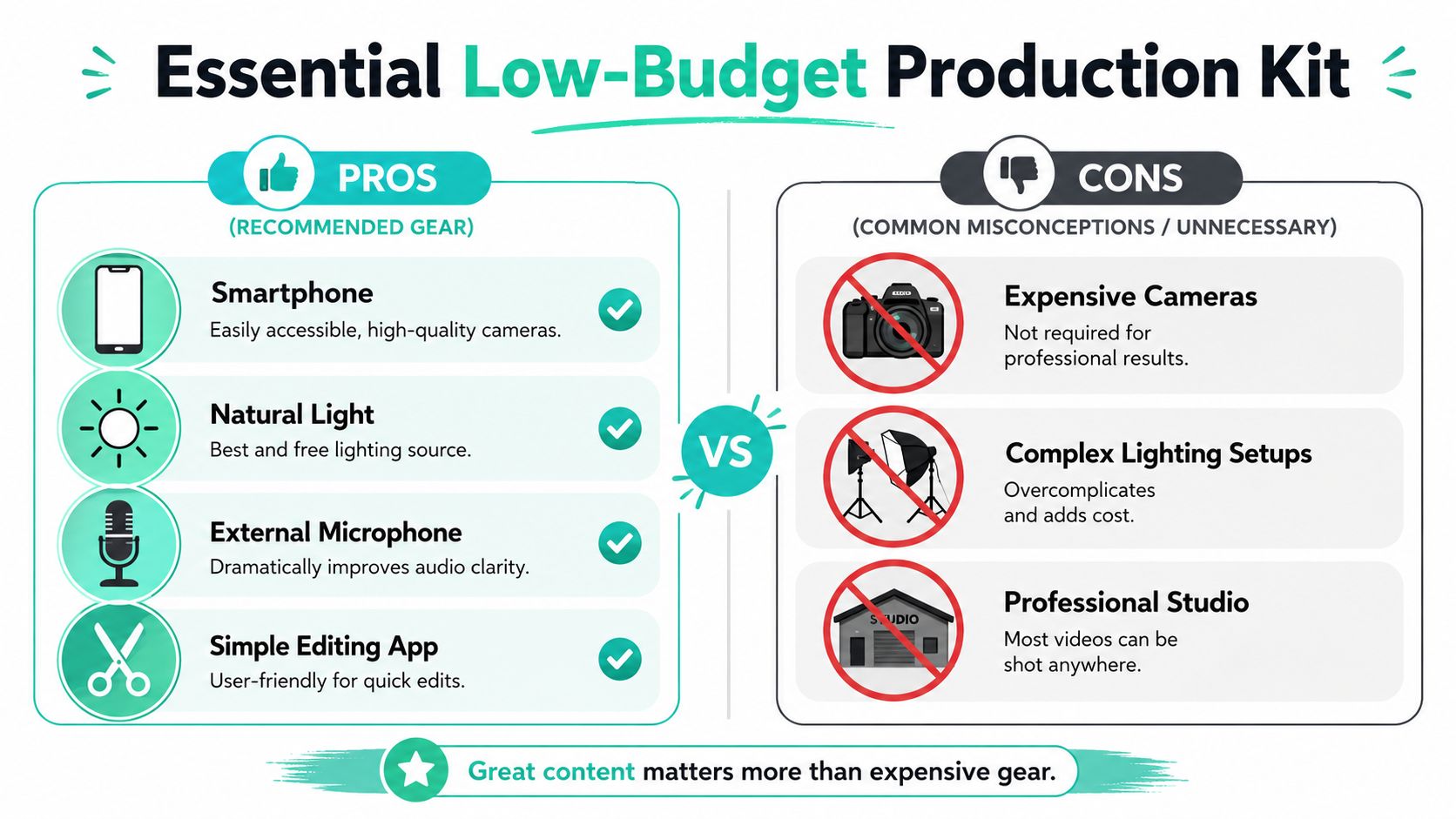
Use the gear you already have first. Then add tools that make your videos easier to watch, easier to hear, and easier to repeat.
Smartphone A recent phone handles most small business marketing videos well. It is quick to set up, familiar to your staff, and far more likely to be used every week than a camera that needs separate storage, batteries, and training.
Tripod Stable footage makes a business look more organized. That matters whether you are filming a dentist explaining an exam, a medspa showing a treatment room, or a law firm recording a process walkthrough.
External microphone Poor audio sinks good video fast. People will forgive a slightly imperfect picture. They rarely stay for muffled speech, hallway noise, or heavy echo.
Natural light or one simple light Window light works well if it is in front of the speaker, not behind them. If your schedule forces you to film early, late, or in interior rooms, one affordable LED light is often a better upgrade than a new camera.
Simple editing app Look for trimming, captions, basic color correction, and easy resizing for vertical and horizontal formats. Extra features sound nice, but they often slow down the person posting the content.
The trade-off is straightforward. More gear can give you more control, but it also gives you more setup time, more decision points, and more chances to postpone recording.
What actually improves video quality
Small business owners often assume quality comes from expensive equipment. In practice, quality usually comes from control.
Control the camera position. Control the sound. Control the light. Control the message.
That matters for on-camera videos and faceless videos alike. A screen-recorded explainer from a law office still needs clean audio and readable text. A medspa treatment clip with text overlays still needs steady framing and consistent light. A dentist filming a quick FAQ still needs a quiet room and a camera angle that feels professional.
Common mistake
Better move
Buying gear before testing video topics
Record several videos on your phone and see what your audience responds to
Filming in noisy rooms
Close the door, turn off fans when possible, and use a mic placed close to the speaker
Using harsh backlighting
Face a window or use one light placed slightly above eye level
Editing every video like a commercial
Trim hard, add captions, keep branding simple, and publish
Recording only when there is spare time
Set one recurring recording block each week or month
One more practical point. A polished setup should match the kind of content you plan to make. If your strategy relies on quick FAQ clips, testimonial recordings, treatment-room b-roll, office walkthroughs, or faceless explainers, speed matters more than cinematic production.
If people can hear the message clearly, follow it without effort, and trust what they are seeing, the production quality is doing its job.
Some teams keep production fully in-house with a smartphone and a checklist. Others record internally and hire freelancers to edit. Some hand off planning and production support to an agency partner. The right choice depends on staff time, approval speed, and how consistently the business wants to publish.
Simple Scripts That Practically Write Themselves
Most owners don't struggle with expertise. They struggle with turning expertise into a script that sounds natural. The easiest fix is to stop writing from scratch every time.
Use a repeatable structure and plug in your details.
A testimonial script
Testimonial videos work when they tell a simple before-and-after story. Not hype. Not vague praise. A clear arc.
Use this template:
Hook “I'd been putting this off because I was nervous about…”
The problem before “Before I came in, I was dealing with…”
The turning point “What changed for me was…”
The result after “After treatment, service, or representation, I felt…”
The recommendation “If you're considering this, I'd say…”
A dental version might focus on fear and comfort. A medspa version might focus on education and confidence. A law firm version might focus on clarity and responsiveness.
A few guardrails help:
Keep it conversational rather than polished
Ask for specifics instead of generic praise
Focus on the decision journey because that's what future clients relate to
End with one clear takeaway the next prospect needs to hear
Ask better prompts and you'll get better testimonials. “What were you worried about before you called us?” usually produces stronger answers than “How was your experience?”
An explainer script
Explainer videos are one of the most useful formats for local service businesses because they let you answer one important question cleanly.
Use this structure:
Script part
Prompt
Pain point
What problem or concern is the viewer dealing with?
Agitate
What makes that problem confusing, stressful, or costly to ignore?
Solution
What service, process, or approach do you offer?
Benefits
What does the viewer gain in practical terms?
Call to action
What should they do next?
A medspa example could sound like this in plain language:
Pain point: “A lot of people want better skin texture but aren't sure where to start.”
Agitate: “That leads to buying random products or booking a treatment that doesn't match the underlying concern.”
Solution: “Microneedling can be a strong option when the goal is texture improvement and collagen support.”
Benefits: “It gives us a treatment path we can tailor and track over time.”
Call to action: “Book a consultation so we can decide whether it fits your skin and timing.”
Keep scripts short enough that they still sound like speech. If a sentence feels awkward when spoken aloud, rewrite it. Video copy should sound like a real person helping another person make a decision.
Getting Eyes on Your Videos A Simple Promotion Plan
Publishing is where many good videos disappear. The clip gets posted once on one platform, then the team moves on. That leaves too much value on the table.
The better approach is to treat every finished video like an asset with several jobs to do.
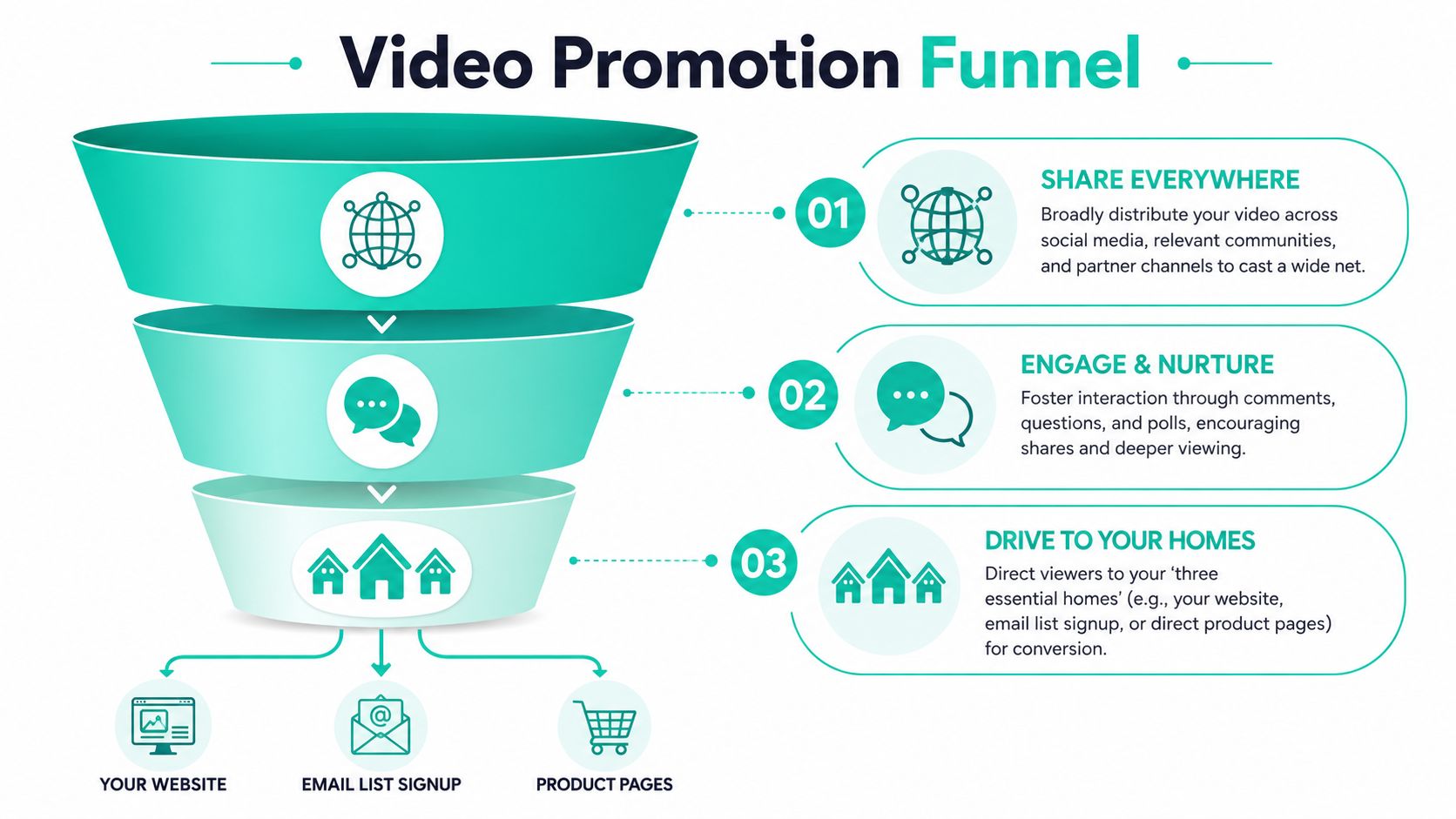
Your three essential homes
Every core video should live in places you control, not just on social feeds.
Your website Put videos on the homepage, service pages, about page, and FAQ sections where they help a decision happen.
Your email marketing Use videos in nurture emails, appointment prep, post-consult follow-up, and reactivation campaigns.
Your primary social channels Pick the platforms your audience already uses. Most local businesses don't need to be everywhere. They need to show up consistently where buyers are paying attention.
While social reach can fluctuate, your website and email list remain reliable business assets.
Repurpose once, distribute several ways
One well-planned video can become multiple pieces of content. That's often the difference between a video program that survives and one that fades after a month.
For example, a longer explainer can become:
A short clip answering one question
A captioned Reel with the strongest line up front
A website embed on the matching service page
An email insert for leads comparing options
A follow-up clip that addresses one objection raised in comments
Publish the full version where it supports conversion
Cut short platform-specific clips from the same source footage
Watch for early engagement and comments that reveal interest
Boost the post that already connects instead of paying to rescue weak content
A point of relief for owners is this: You don't need a constant stream of brand-new concepts. You need a few useful videos, distributed with discipline.
How to Measure Success Beyond the View Count
A medspa owner posts a polished treatment video and gets plenty of views. Two weeks later, the front desk reports no lift in consultations. A different video, a simple FAQ with before-and-after context and a clear next step, brings in three qualified inquiries. That is why view count sits near the top of the dashboard, but not at the center of the decision.
Start with the action you want. For a dentist, that might be a new patient form submission. For a law firm, it could be a case evaluation request. For a camera-shy owner using faceless videos, it may be a click to a service page or a call from someone who finally understands the process.
Then track that action in a way you can review later. Use distinct links for each video, platform, or call to action so you can see which topic and format brought in qualified traffic. A walkthrough of a dental implant process may pull fewer views than a quick office tour and still produce better leads. The same goes for a faceless medspa video built from treatment footage, on-screen text, and narration. If it brings in consultation requests, it is doing its job.
Good measurement gets more specific over time. Look at inquiry quality, not just volume. Did the caller ask about the service featured in the video? Did the lead mention the FAQ you covered? Did the consultation show up informed and ready to move? Those signals help separate empty attention from buying intent.
Views show reach. Conversions, lead quality, and booked appointments show business impact.
If you want help building a consistent video system, Leaping Lemur Media works with practices and local businesses on strategy, messaging, and performance-focused content that fits how they serve their communities.